Make room for the stops worth taking
Find places to stop along your road trip route
A good stop should fit your journey. Discover attractions, restaurants, hotels, and fuel stops between route points, look at the detour, and add the places your group wants to visit in RoamLine.
Android early access · iOS coming later
From route to possibilities
Discover stops between two route points
Start with a journey you can actually drive. In your trip’s Explore tab, the current segment tells you which two route points you are exploring between. Browse suggested places or search for a particular place before changing your itinerary.
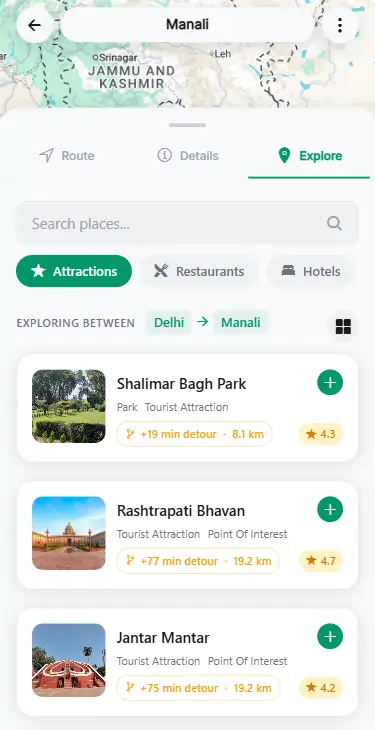
Choose the part of your journey
Explore between your start and destination or between consecutive route points. A stop that works on the outbound journey may belong on a different segment on the return.
Browse by what you need
Switch between Attractions, Restaurants, Hotels, and Fuel Pumps. Use place search when your group already has a specific destination in mind.
Open the place details
Review the address, available photos, rating, and reviews before deciding. Missing information does not mean a place is open or suitable for your group.
A better way to decide
Compare the detour with the time you have
Distance from the starting point and extra distance off the direct route answer different questions. A place can be close to your start while still adding an inconvenient detour. Read the displayed estimate in context, then allow time to park, visit, eat, and regroup.
For an illustrative driving day, suppose your group has a 90-minute break window. One stop needs a short detour and a 30-minute visit; another would use most of that window before anyone has eaten. Keep the first, save the second for another trip, and leave spare time before your overnight stay.
Choose one priority stop
Agree on the attraction everyone wants to visit first. Treat extra stops as optional so a delayed departure does not force you to rush the rest of the day.
Check practical details
Confirm opening times and access with the venue. Consider parking, walking distance, meal needs, and the preferences of everyone traveling.
Keep your next arrival realistic
Compare the changed route with your accommodation check-in and group plans. Remove an optional stop when it no longer fits.
RoamLine estimates help you compare options. They are not guarantees of arrival time, live venue availability, or a complete list of every place along the road.
Turn ideas into your itinerary
Add the stop where it belongs
Open the place and use Add to Route when you have route-editing permission. Review its position in the route, keep stops in a sensible order, and mark overnight stays when you want to break a longer journey into days.
Let everyone explore
Accepted trip members can browse place details. The Route Manager controls additions to the saved trip’s route, so suggestions can become one agreed plan.
Keep outbound and return stops clear
For a round trip, put each stop on the intended journey leg. Check the route again after adding or reordering places.
Know what needs a connection
Place discovery, photos, route calculations, and estimates need internet. Use the app’s Google Maps handoff for navigation; RoamLine does not provide turn-by-turn directions.
Before you go
Road trip stops FAQs
Can I find restaurants and fuel stops as well as attractions?
Yes. Trip Explore has categories for Attractions, Restaurants, Hotels, and Fuel Pumps, plus place search. Results depend on the selected route segment and provider availability.
Can every traveler add stops to a shared route?
All accepted members can browse. Adding stops to a saved trip is controlled by the Route Manager. Android guests can try a device-local draft with one intermediate stop; an account is required for a second stop and shared trip features.
Does this website have a stop finder I can use in my browser?
This page explains RoamLine’s app workflow. Use Android early access to explore places in the app. No live place search or browser route planner is available on this page.
Can I discover stops or navigate offline?
Discovery and route estimates require internet. RoamLine’s saved offline-trip feature is currently paused, and the app does not provide turn-by-turn navigation. Check your separate navigation app’s capabilities before setting off.
Keep planning
Give your next drive a few better stops.
Explore places, compare detours, and keep your chosen stops in one trip with RoamLine.
Android early access · iOS coming later